> ## Documentation Index
> Fetch the complete documentation index at: https://docs.piebald.ai/llms.txt
> Use this file to discover all available pages before exploring further.
# Python environment sourcing
When Piebald detects Python environments (e.g. `conda` or a venv) globally or in your project folder, it provides a menu to activate an environment for use in future `RunTerminalCommand` tool calls. For example, if you have a venv in your project and you've activated that venv in Piebald, Python scripts that the model runs will have access to all packages installed in that venv.
Piebald currently supports the following Python environment managers:
* `conda`
* `pixi`
* `micromamba`
* venvs (through `uv` or `pip`)
Please [let us know](https://github.com/Piebald-AI/piebald-issues/issues/new) if you'd like support for another tool!
## Usage
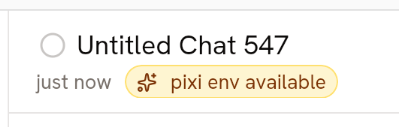
Piebald automatically detects and displays a menu of all global and project-specific Python environments. When there are Python environments available, a badge is added to the top chat bar:
 Clicking the badge will reveal a menu of all available Python environments.
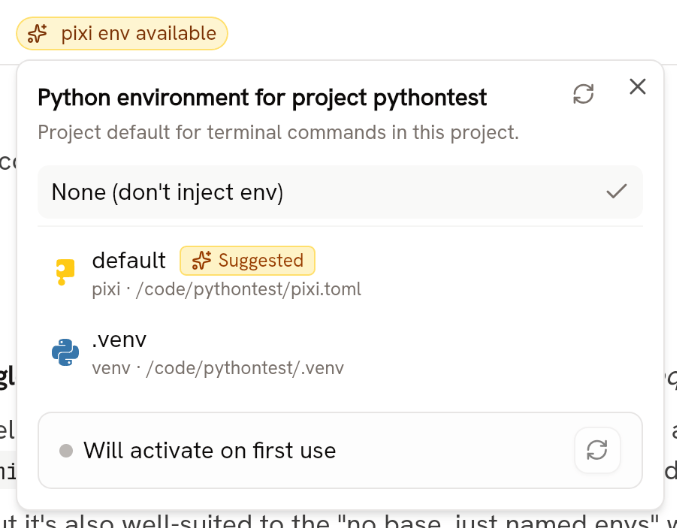 Once you've selected a Python environment, the badge will update to show it and Piebald will get and cache environment variables from the environment that you selected. The length of time that the environment variables have been cached is displayed at the bottom of the Python environments menu.
### Getting environment variables
Piebald gets environment variables from your environment by executing a command using the Python environment manager's CLI.
On Windows:
* `conda` environments: `conda run -p cmd /c set`
* `pixi` environments: `pixi run -e cmd /c set`
* `micromamba` environments: `micromamba run -p cmd /c set`
On other platforms:
* `conda` environments: `conda run -p env`
* `pixi` environments: `pixi run -e env`
* `micromamba` environments: `micromamba run -p env`
The environment variables are parsed from the output and cached for use in future `RunTerminalCommand` tool calls.
Once you've selected a Python environment, the badge will update to show it and Piebald will get and cache environment variables from the environment that you selected. The length of time that the environment variables have been cached is displayed at the bottom of the Python environments menu.
### Getting environment variables
Piebald gets environment variables from your environment by executing a command using the Python environment manager's CLI.
On Windows:
* `conda` environments: `conda run -p cmd /c set`
* `pixi` environments: `pixi run -e cmd /c set`
* `micromamba` environments: `micromamba run -p cmd /c set`
On other platforms:
* `conda` environments: `conda run -p env`
* `pixi` environments: `pixi run -e env`
* `micromamba` environments: `micromamba run -p env`
The environment variables are parsed from the output and cached for use in future `RunTerminalCommand` tool calls.