> ## Documentation Index
> Fetch the complete documentation index at: https://docs.piebald.ai/llms.txt
> Use this file to discover all available pages before exploring further.
# Managing projects
In Piebald, *projects* are the folders that you use to chat and perform agentic development. If your project is a Git repo with worktrees, the worktrees are treated as projects; otherwise, the folder itself is the project.
### Opening projects
To open a project, open the "NN PROJECTS" dropdown menu from the sidebar and click **Open folder...**
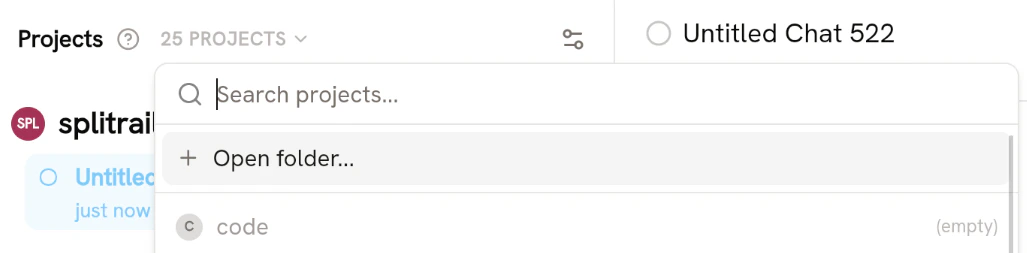 Once you've opened a folder, a chat will automatically be created in that project.
### Deleting projects
If you've had a few chats or agentic development sessions in a folder, but now you want to remove the projects, you can delete the project. Deleting the projects will also delete all chats in that folder.
Open the "NN PROJECTS" dropdown menu, hover your project, and click **Delete**:
Once you've opened a folder, a chat will automatically be created in that project.
### Deleting projects
If you've had a few chats or agentic development sessions in a folder, but now you want to remove the projects, you can delete the project. Deleting the projects will also delete all chats in that folder.
Open the "NN PROJECTS" dropdown menu, hover your project, and click **Delete**:
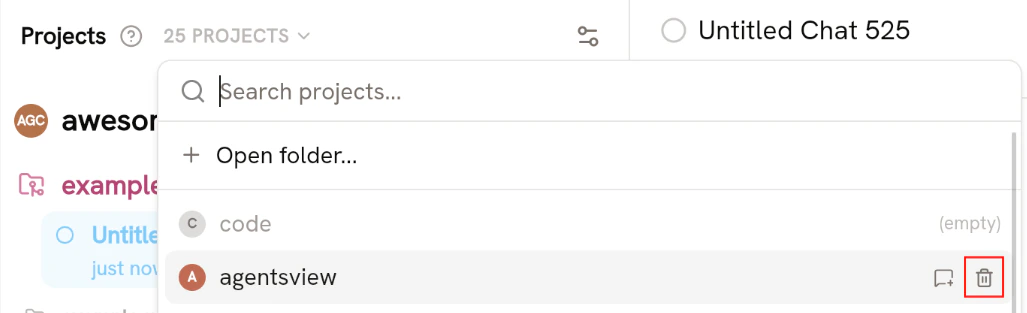 You'll be prompted to confirm the deletion. Click **Delete**.
### Renaming projects
Projects can be renamed at any time. Hover your project and click the settings icon:
You'll be prompted to confirm the deletion. Click **Delete**.
### Renaming projects
Projects can be renamed at any time. Hover your project and click the settings icon:
 Then go to the **General** section and enter a new name for the project. The project's name instantly updates in the sidebar once you click off or press Enter.