> ## Documentation Index
> Fetch the complete documentation index at: https://docs.piebald.ai/llms.txt
> Use this file to discover all available pages before exploring further.
# GitHub Copilot
> Use your GitHub Copilot subscription from Piebald.
Available in Piebald Basic (Free)
Piebald supports using your GitHub Copilot subscription to use for generation.
To sign in to your GitHub Copilot subscription in Piebald:
1. Go to **Settings → Providers → New Provider → GitHub Copilot → Sign in with GitHub**
2. Choose "GitHub.com"
3. Copy the code displayed on screen
4. Open the URL in your browser ([https://github.com/login/device](https://github.com/login/device))
5. Sign in to your GitHub account if you're not already signed in
6. Paste in the code and click Continue
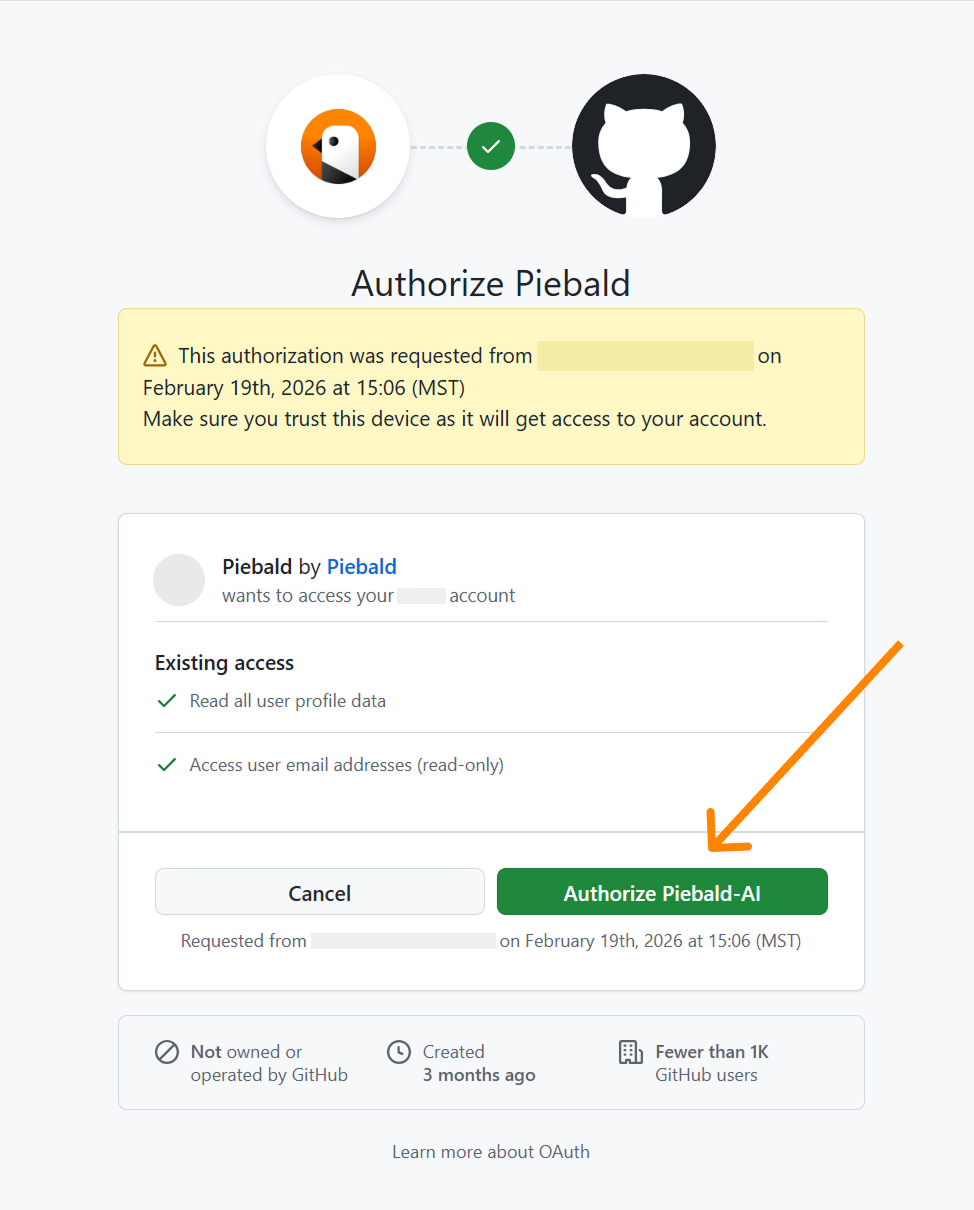
7. You'll be asked to grant the **[@Piebald-AI](https://github.com/Piebald-AI)** organization read-only access to your GH account. Click "Authorize Piebald-AI":
 8. Go back to Piebald and wait for a few seconds for the authentication finish