> ## Documentation Index
> Fetch the complete documentation index at: https://docs.piebald.ai/llms.txt
> Use this file to discover all available pages before exploring further.
> How to report feedback on Piebald.
# Report feedback
Available in Piebald Basic (Free)
Reporting feedback on Piebald is easy—hit the smile icon in the sidebar or navigate to **Help → Submit Feedback**. A dialog will appear in the bottom right corner allowing you to submit a feature request, bug report, or general enhancement suggestion.
## Reporting generation errors
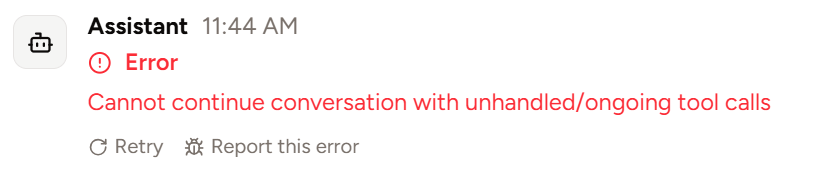
When an error occurs during message generation, you can optionally report the error via a convenient "Report this error" button under the error message.
This is especially helpful when the error is a Piebald bug, because you can optionally choose to attach the entire content of your chat to the feedback, which will enable us to debug the problem much more easily. Data submission is subject to our [Privacy Policy](https://piebald.ai/privacy).