

AWS_ACCESS_KEY_IDandAWS_SECRET_ACCESS_KEYenvironment variables.- Shared credentials (
~/.aws/credentials) - IAM role if running on EC2/ECS/Lambda
- AWS SSO
Creating an Amazon Bedrock provider
To create an Amazon Bedrock provider, go to Settings → Providers → New Provider → Amazon Bedrock. If you have a specific access key ID + secret access key pair, choose Access Key; if you’re using Bedrock with an API key, choose API key; otherwise choose Default Credentials to have Piebald detect credentials from the environment.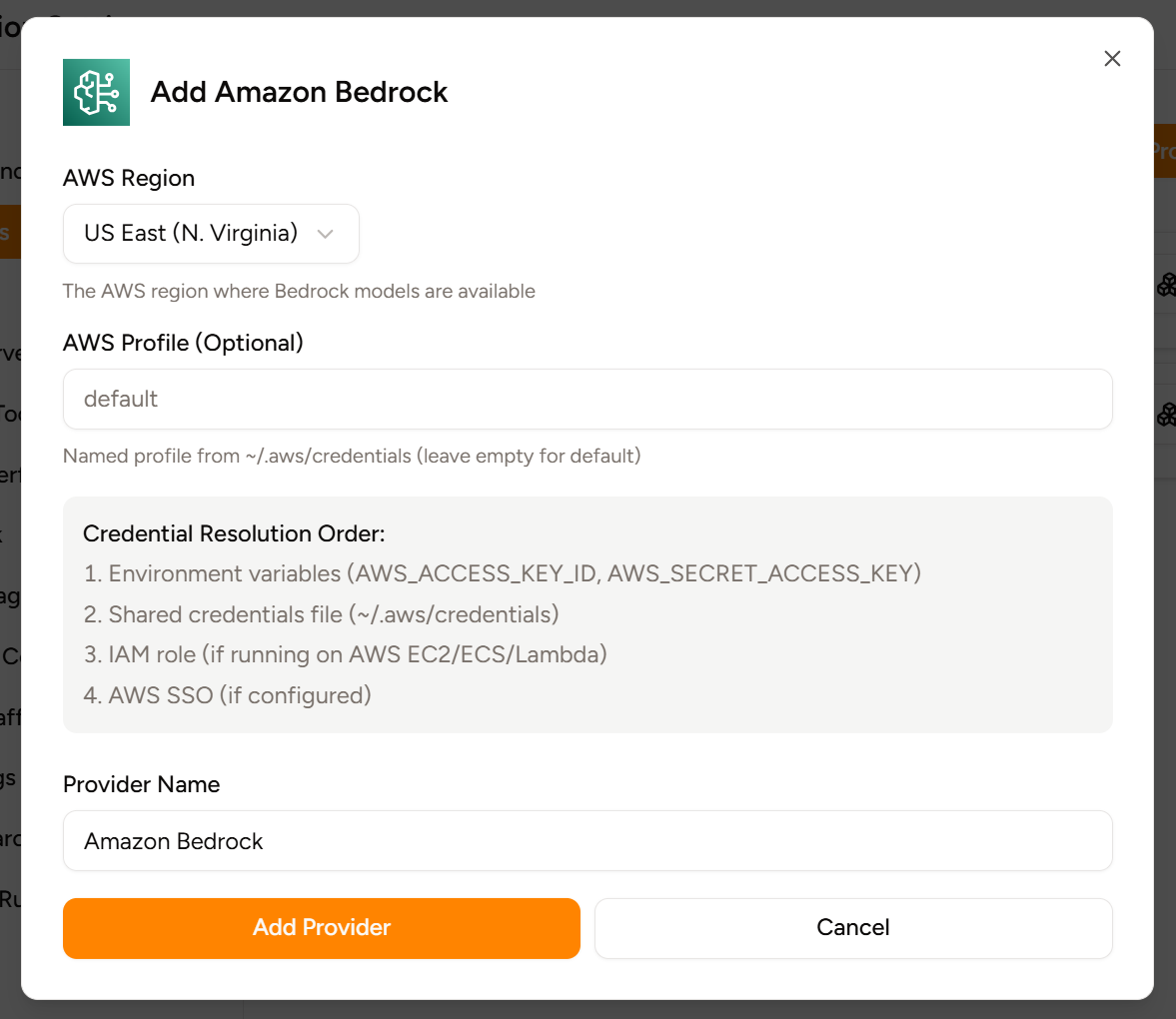
IAM permissions
Piebald uses the newer Amazon Bedrock Converse API (instead of the older Invoke API) to communicate with models on Bedrock, so you’ll need to allow thebedrock:Converse and bedrock:ConverseStream APIs for the IAM entity you use. For example:
Bedrock API keys
We don’t support Bedrock API keys yet. However, if you need to use Bedrock API keys, open an issue and let us know!Common errors
You may encounter various errors when using different Bedrock models with different configurations in Piebald. We’re working to stabilize our support for Amazon Bedrock and make errors more intuitive, but in the meantime, below is a list of several errors with explanations. Errors coming from AWS will have the following format:Bedrock converse_stream request failed: <SomeType>Exception - <error message>
“Invocation of model ID <model ID> with on-demand throughput isn’t supported. Retry your request with the ID or ARN of an inference profile that contains this model.”
You can’t use the foundation model directly; you need to use an inference profile instead. Look for the same model name but prefixed with a region like “GLOBAL” (global.) or “US” (us.).
”The model returned the following errors: Malformed input request: #/toolConfig/tools/10: extraneous key [cachePoint] is not permitted, please reformat your input and try again.”
The model doesn’t support caching tool definition. (It might still support caching messages though.) Turn off caching tool definitions in the chat settings → Overrides → Amazon Bedrock overrides → Cache Tool Definitions.
”The model is unsupported for streaming.”
You’ve specified a model that doesn’t support text output, like an embeddings or image generation model. Piebald does not support using a non-text mode.”You invoked an unsupported model or your request did not allow prompt caching. See the documentation for more information.”
As the error message says—either you used a model that your account doesn’t have access to, or the model you’re using doesn’t support prompt caching, which is enabled in the current chat. To disable prompt caching, go to the **Settings → Overrides → bedock → enable prompt caching. If prompt caching is disabled and you’re still getting the error, then it’s because you don’t have access to the model on Bedrock. If you’re a first-time user of Claude models on Bedrock, you need to submit use case details in order to get access; see Claude Code docs.”This model doesn’t support tool use in streaming mode.”
This error means that the model you’re using doesn’t support tools at all. Disable tool use in the chat/profile settings → Configuration → Enable tools.”The model returned the following errors: Malformed input request: #: extraneous key [thinking] is not permitted, please reformat your input and try again.”
You’ve configured Claude reasoning for the chat/profile but you’re using a non-Claude model. Disable Claude reasoning or use a Claude model
”The model returned the following errors: Malformed input request: #: extraneous key [reasoningConfig] is not permitted, please reformat your input and try again.”
Same as above; you’ve configured Nova reasoning for the chat/profile but you’re using a non-Nova model. Disable Nova reasoning or use a Nova model
”Model access is denied due to IAM user or service role is not authorized to perform the required AWS Marketplace actions (aws-marketplace:ViewSubscriptions, aws-marketplace:Subscribe) to enable access to this model. Refer to the Amazon Bedrock documentation for further details. Your AWS Marketplace subscription for this model cannot be completed at this time. If you recently fixed this issue, try again after 5 minutes.”
Some models on Bedrock are served via the marketplace, and if you’re using one, Bedrock will try to enable it from the marketplace automatically. However, if your AWS credentials don’t allow the necessary AWS actions (aws-marketplace:ViewSubscriptions and aws-marketplace:Subscribe in this case), it will be unable to do that. See this Amazon Bedrock docs page.