

Rich text editor
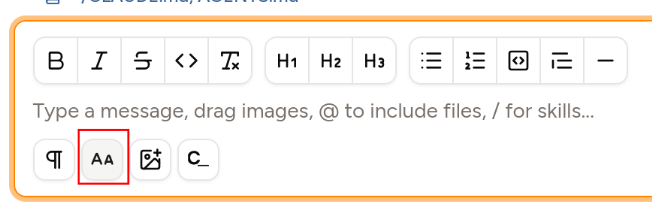
Available in Piebald Basic (Free) The message editor can be switched into rich text mode. Click the paragraph/pilcrow icon: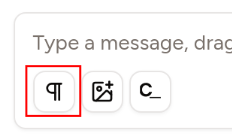
- Ctrl+B for bold
- Ctrl+I for italic
- Ctrl+U for underline
- Ctrl+Shift+X for
strikethrough
Queuing messages
Available in Piebald Pro While the agent is working, you may want to send additional messages to iterate, steer, or queue up another task when it’s done with its current work. Piebald has three modes for messaging during generation:- Interrupt & send immediately: This will nterrupt the current generation or tool call immediately and send the message.
- Queue & send as soon as possible: This will send the message when the model is finished generating the current message or calling the current tool, but without forcibly interrupting it.
- Queue as a follow-up: This will send the message when the agent is completely finished with the task at hand, i.e. it responds with text only, without calling any tools.
Slash commands
Available in Piebald Basic (Free) Piebald supports slash commands to trigger various functionality in the app. All project-specific and global agent skills are also exposed as slash commands.Builtin slash commands
The builtin slash commands are restricted to a single action—opening a select menu, dropdown, or dialog. In the future, though, we’ll enhance them to accept parameters and complete the action instead of just opening the dropdown or dialog./mode,/profile, and/modelopen the Permission Mode, Profile, and Model selection dropdown menus./pastepastes clipboard content as a markdown codeblock./copy-chatcopies the entire chat as markdown./compactcompacts the current chat’s context./clearclears the current context window by creating a new chat./discordopens our Discord invite page (https://piebald.ai/discord)./settingsopens the Settings dialog./searchopens the Search chats dialog./helpopens this site, the Piebald docs (https://docs.piebald.ai)./feedbackopens the Report feedback popup.
OpenCues integration
Available in Piebald Basic (Free) Piebald features an integration with OpenCues, enabling an AI model to complete your prompt typed into the message box. OpenCues operates via cues and blanks. The configured LLM reads your text, looking for opportunities to correct or complete. Cues trigger the LLM at intervals as you type, and blanks are triggered when you end your prompt with a space and_. Read more on Piebald’s OpenCues integration here.
If you don’t wish to use OpenCues, you can hide the OpenCues button at Settings > OpenCues > Show the OpenCues button.