In Piebald, projects are the folders that you use to chat and perform agentic development. If your project is a Git repo with worktrees, the worktrees are treated as projects; otherwise, the folder itself is the project.

Opening projects

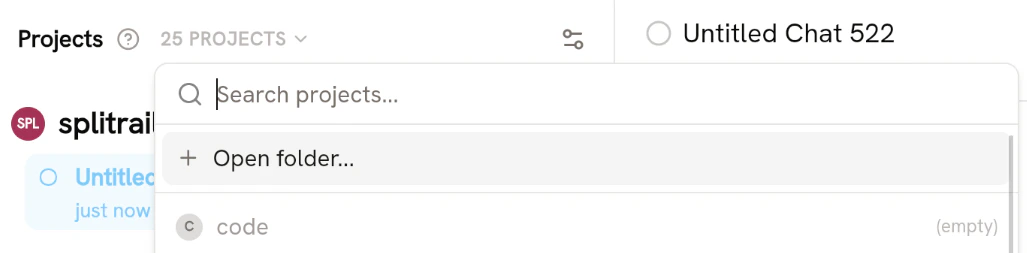
To open a project, open the “NN PROJECTS” dropdown menu from the sidebar and click Open folder… projects_open_folder.png Once you’ve opened a folder, a chat will automatically be created in that project.
Deleting projects

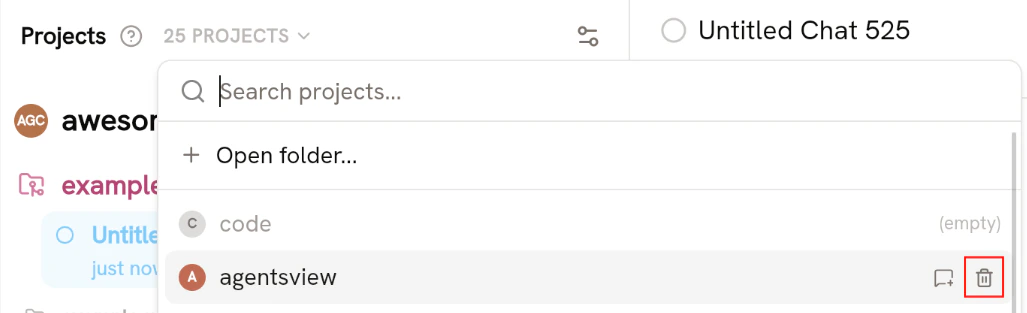
If you’ve had a few chats or agentic development sessions in a folder, but now you want to remove the projects, you can delete the project. Deleting the projects will also delete all chats in that folder. Open the “NN PROJECTS” dropdown menu, hover your project, and click Delete: delete_project.png You’ll be prompted to confirm the deletion. Click Delete.
Renaming projects

Projects can be renamed at any time. Hover your project and click the settings icon: project_settings_button.png Then go to the General section and enter a new name for the project. The project’s name instantly updates in the sidebar once you click off or press Enter.
